

Phase 4 – Migration Execution
This is where workloads are moved to the VCF platform. Execution is the most critical phase of any enterprise migration program. After weeks or months of discovery, assessment, dependency mapping, and planning, this is where workloads are migrated into the target VMware Cloud Foundation (VCF) platform. The objective is to execute migrations with minimal business disruption while ensuring application availability, data integrity, and operational continuity.
A successful execution phase is not just about moving virtual machines—it is about orchestrating people, processes, automation, governance, and technology to deliver predictable business outcomes.
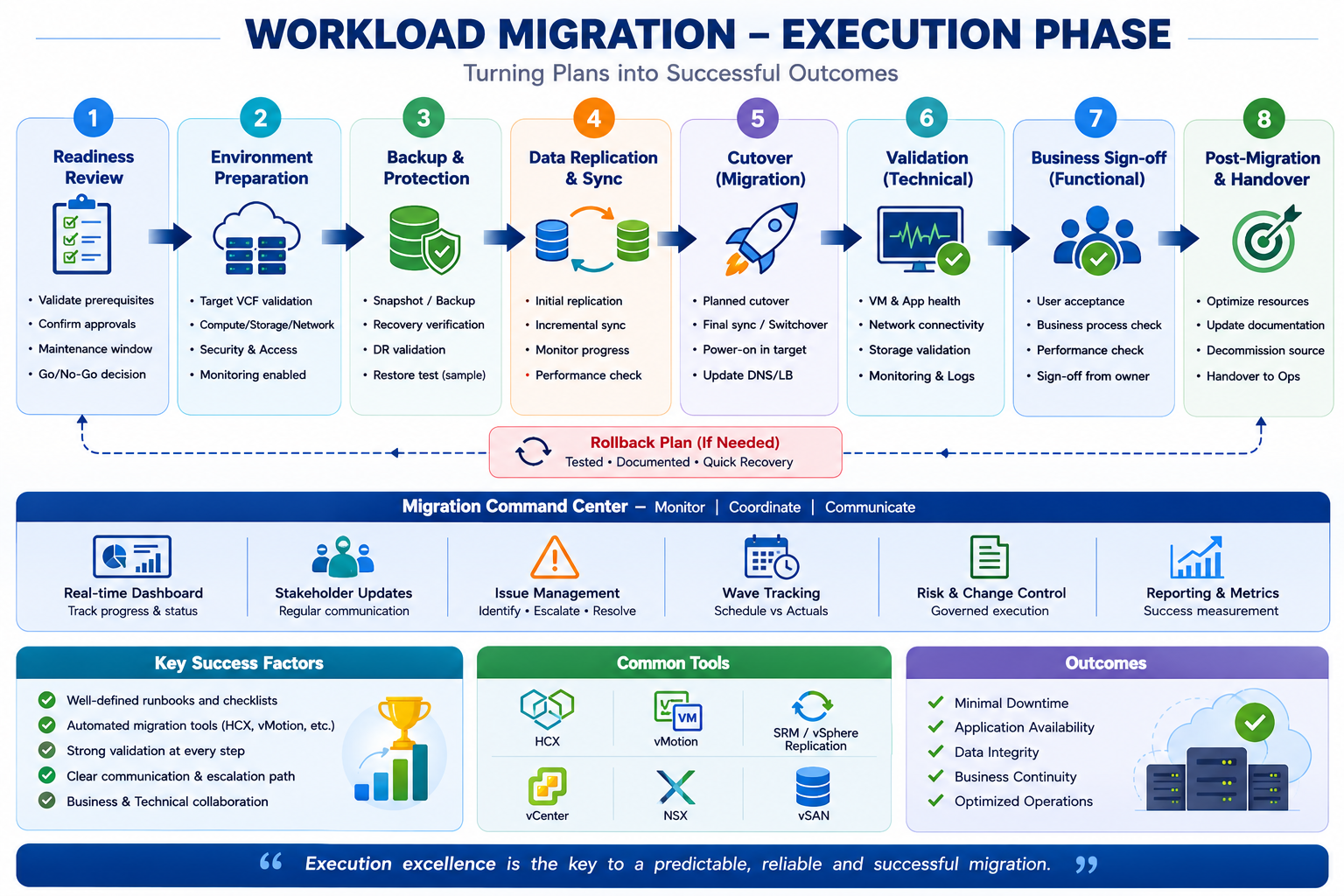
Migration Readiness Review
Before any migration begins, perform a final readiness assessment to confirm that all prerequisites are complete.
Activities
- Change approvals obtained
- Maintenance window confirmed
- Stakeholders notified
- Migration runbook approved
- Rollback strategy documented
- Application owners available
- Support teams on standby
Deliverable: Go/No-Go decision.
Infrastructure Validation
Validate the target VCF environment before moving workloads.
Validation Checklist
- Compute capacity available
- Storage policies configured
- Network connectivity verified
- NSX segments and gateways ready
- DNS and NTP functioning
- Firewall rules applied
- Monitoring and logging enabled
Deliverable: Target environment ready for migration.
Business validation confirms users can access and use applications successfully.
Backup & Recovery Verification
Protect workloads before any changes occur.
Activities
- Successful backup verification
- Snapshot creation (where appropriate)
- Restore testing
- Disaster recovery validation
- Recovery documentation reviewed
Deliverable: Recoverability confirmed.
Replication & Synchronization
Transfer workload data to the target platform while production remains online.
Typical methods include:
- HCX Replication Assisted vMotion
- HCX Bulk Migration
- Cross-vCenter vMotion
- Storage vMotion
- Cold Migration (planned downtime)
Activities:
- Initial data replication
- Incremental synchronization
- Network extension (if required)
- Replication monitoring
Deliverable: Target workload synchronized and ready for cutover.
Migration Cutover
The cutover is the controlled transition from the source environment to VCF.
Typical Sequence
- Pause application activity.
- Synchronize final data changes.
- Shut down the source workload (if required).
- Complete the migration.
- Start the workload in the target environment.
- Redirect users or update DNS/load balancers.
- Verify application availability.
Deliverable: Workload operational on VCF.
Technical Validation
Confirm the migrated workload is healthy.
Validation Areas
- VM power state
- VMware Tools status
- Network connectivity
- Storage accessibility
- CPU and memory utilization
- DNS resolution
- Authentication
- Monitoring agents
- Backup jobs
- Security controls
Deliverable: Technical validation completed.
Business Validation
Migration success is measured by business outcomes.
Business Checks
- Application login successful
- Critical transactions complete
- End-user access verified
- Performance acceptable
- Business owner approval received
Deliverable: Business sign-off.
Post-Migration Optimization
Once workloads are stable, optimize the new environment.
Optimization Tasks
- Right-size virtual machines
- Enable DRS and HA
- Apply storage policies
- Configure monitoring and alerts
- Update CMDB and documentation
- Decommission legacy resources
- Capture lessons learned
Deliverable: Migration closed and transitioned to operations.
Migration Command Center
During execution, organizations often establish a Migration Command Center to coordinate activities and monitor progress.
Key responsibilities:
- Track migration waves and schedules
- Monitor replication and cutover status
- Coordinate infrastructure, application, network, and security teams
- Escalate and resolve issues
- Communicate status to stakeholders
- Capture metrics and risks in real time
Executive Success Metrics
| KPI | Target |
|---|---|
| Migration Success Rate | >99% |
| Application Availability | 99.9%+ |
| Rollback Events | <1% |
| Business Sign-Off | 100% |
| Critical Incidents | 0 |
| Migration Wave Completion | On Schedule |
Best Practices
- Execute migrations in predefined waves based on application dependencies.
- Use automation wherever possible to reduce manual effort and human error.
- Validate technical and business functionality after every migration.
- Maintain a tested rollback plan for each migration wave.
- Operate a centralized Migration Command Center with clear communication channels.
- Review lessons learned after every wave and continuously improve the migration process.
Leave a Reply
You must be logged in to post a comment.